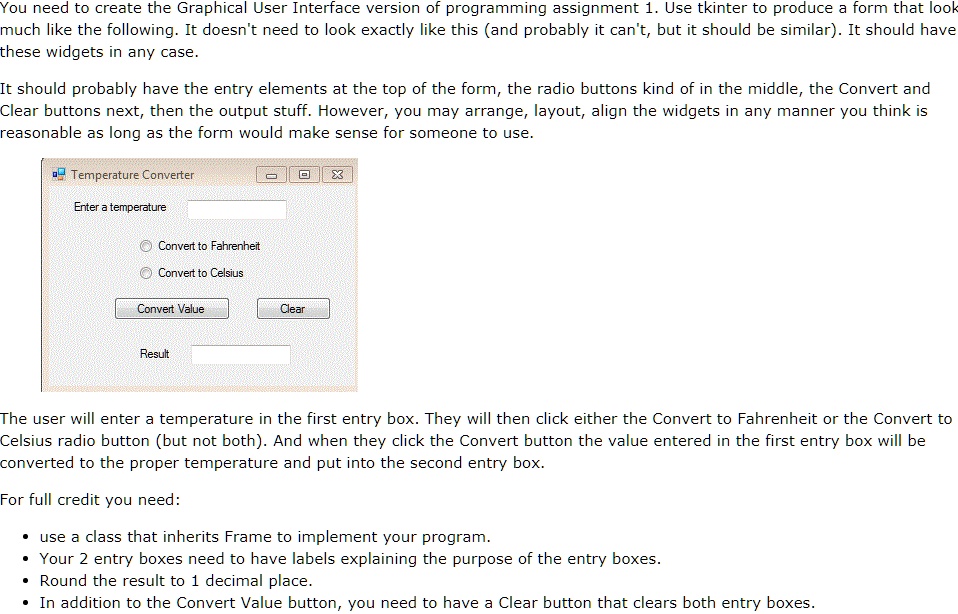
You need to create the Graphical User Interface version of programming assignment 1. Use tkinter to produce a form that look
much like the following. It doesn't need to look exactly like this (and probably it can't, but it should be similar). It should have
these widgets in any case.
It should probably have the entry elements at the top of the form, the radio buttons kind of in the middle, the Convert and
Clear buttons next, then the output stuff. However, you may arrange, layout, align the widgets in any manner you think is
reasonable as long as the form would make sense for someone to use.
Temperature Converter
Enter a temperature
Convert to Fahrenheit
Convert to Celsius
Convert Value
Clear
Result
The user will enter a temperature in the first entry box. They will then click either the Convert to Fahrenheit or the Convert to
Celsius radio button (but not both). And when they click the Convert button the value entered in the first entry box will be
converted to the proper temperature and put into the second entry box.
For full credit you need:
\begin{itemize}
\item use a class that inherits Frame to implement your program.
\item Your 2 entry boxes need to have labels explaining the purpose of the entry boxes.
\item Round the result to 1 decimal place.
\item In addition to the Convert Value button, you need to have a Clear button that clears both entry boxes.
\end{itemize}